Skip to content

Desk And Stream

Level up your setup

Primary Menu
  • Home
  • Articles
  • Reviews
  • Guides
  • Home
  • Review
  • Deep Dive: Is the ASUS Zenbook the Ultimate Mid-Range Laptop for Remote Work?
  • Review

Deep Dive: Is the ASUS Zenbook the Ultimate Mid-Range Laptop for Remote Work?

Why the Asus Zenbook might be the mid-range laptop for you.
Published: August 4, 2025 | Updated: August 3, 2025 3 min read
163 views
asus zenbook

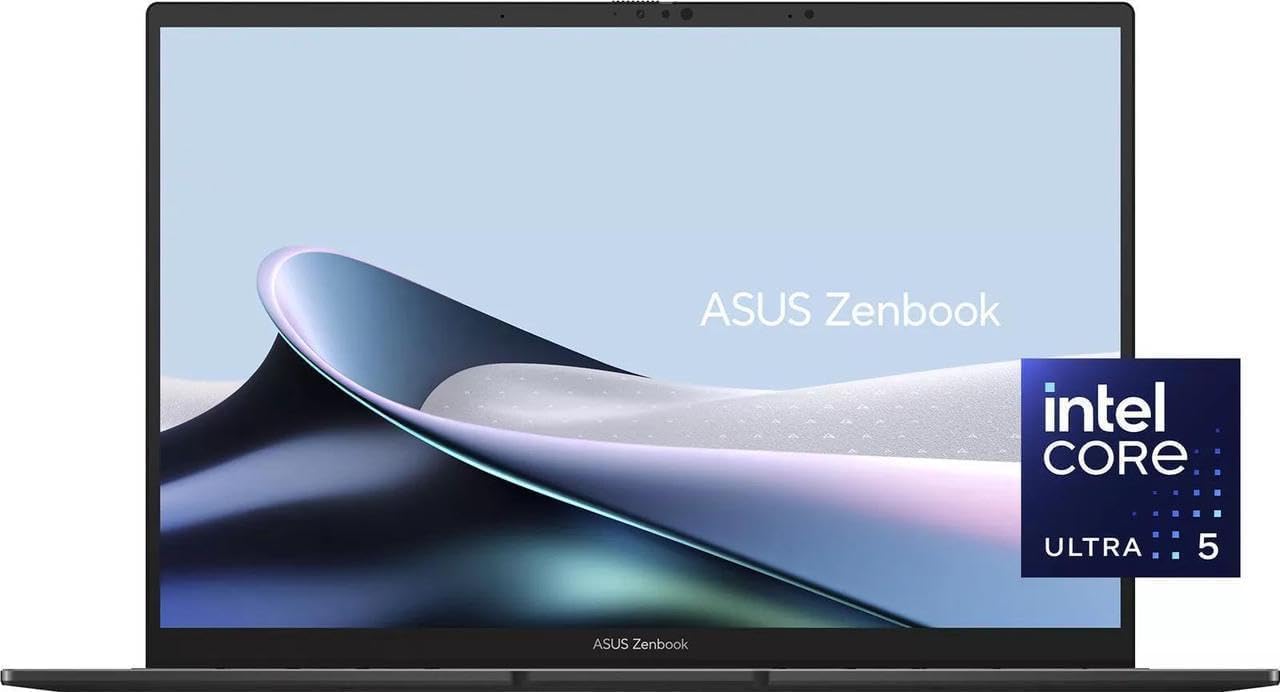
In our recent comparison, the ASUS Zenbook was crowned the best overall choice for remote workers seeking a powerful and stylish mid-range laptop. But what truly sets it apart from the competition? A deep dive into its features reveals that this isn’t just a powerful machine; it is a meticulously crafted device that focuses on delivering a premium user experience without the premium price. Let’s break down the key aspects of its performance, design, and usability to understand why it is a leader in its class.

Performance and Everyday Use

The Zenbook line is known for packing a punch, and this model is no exception. It is often equipped with the latest-generation Intel or AMD processors, providing exceptional speed and responsiveness for a wide range of tasks. Whether you’re juggling multiple browser tabs, running complex spreadsheets, or engaging in light creative work, the Zenbook handles it all with ease. The fast SSD storage ensures quick boot times and rapid file access, a crucial factor for a seamless workflow. The real star of the show, however, is the stunning touchscreen display, which provides a rich, vibrant canvas for all your work and entertainment needs.

Design and Key Features

The design of the ASUS Zenbook is where it truly shines. It boasts a sleek, all-metal chassis that feels both durable and incredibly light, making it a dream for professionals on the move. The touchscreen display with thin bezels not only looks modern but also enhances the viewing experience. The keyboard is comfortable and responsive, making long typing sessions feel effortless. The inclusion of a wide array of ports, including HDMI and USB-C, means you can connect to monitors and other peripherals without the need for dongles, a huge advantage for remote work. This blend of elegance and practicality is what gives the Zenbook its winning edge.

The Trade-Offs

While the Zenbook excels in many areas, there are a few compromises to consider. The battery life, while more than adequate for most users, may not quite match the all-day longevity of competitors like the MacBook Air. The touchscreen, while a fantastic feature, can also introduce glare in brightly lit environments. Additionally, some users might find the speakers to be average, but this is a minor trade-off for a laptop that is otherwise packed with premium features. For most remote workers, these are minor issues that do not detract from the overall outstanding value of the device.

The Verdict: The Perfect Blend of Power and Elegance

After a deep dive, the ASUS Zenbook solidifies its position as the best mid-range laptop for remote work. It is a machine that perfectly marries power with a premium aesthetic and features a display that has to be seen to be believed. For a user who needs a reliable, high-performance laptop for productivity and creative tasks, all while maintaining a portable and elegant form factor, the Zenbook is an exceptional choice. Its fantastic 4.7-star rating on Amazon reflects its widespread acclaim among users who demand both form and function.

As an Amazon Associate, I earn from qualifying purchases.

About the Author

product

Editor

View All Posts
  • Review

Post navigation

Previous: The 3 Best Mid-Range Laptops for Remote Work
Next: External Drives: Your Solution for More Space and Speed

Related Stories

hyperx-quadcast-review-cover-v8
  • Review

Is the HyperX QuadCast Still Worth It for a Streaming Desk Setup?

April 14, 2026 29
shure-mv7-review-cover-v11
  • Review

Why the Shure MV7 Still Feels Like the Smart USB Mic for Creators and Remote Workers

April 14, 2026 22
Minimal editorial featured image for an Insta360 Link 2C webcam review with clean monitor and webcam setup
  • Review

The Webcam Upgrade Your Desk Setup Actually Needs: Why the Insta360 Link 2C Is Worth It

April 12, 2026 30
Dirty PC
  • Review

The Smart Way to Clean: Canned Air is Dead. This is the New King.

September 16, 2025 179
remote work lenovo
  • Review

Deep Dive: Is the Lenovo IdeaPad 3 the Ultimate Budget Laptop for Remote Work?

August 3, 2025 174
ErGear Desk
  • Review

The Definitive Review: Why the ErGear Adjustable Electric Standing Desk is the Only Desk You Need

July 30, 2025 176

Trending Now

Shure MV7 and Insta360 Link 2C: The Two Desk Upgrades That Make Calls Feel Instantly Better shure-mv7-and-insta360-call-upgrade-cover-v1 1

Shure MV7 and Insta360 Link 2C: The Two Desk Upgrades That Make Calls Feel Instantly Better

April 18, 2026
Insta360 Link 2C vs Your Laptop Webcam: What Actually Changes on Calls insta360-link-2c-vs-built-in-webcam-cover-v1 2

Insta360 Link 2C vs Your Laptop Webcam: What Actually Changes on Calls

April 18, 2026
MacBook Air M4 and Insta360 Link 2C: Two Desk Upgrades That Make Remote Work Feel More Polished macbook-air-and-insta360-article-cover-v5 3

MacBook Air M4 and Insta360 Link 2C: Two Desk Upgrades That Make Remote Work Feel More Polished

April 14, 2026
MacBook Air M4 Setup Guide: A Cleaner Remote Work and Creator Laptop Setup macbook-air-guide-cover-v5 4

MacBook Air M4 Setup Guide: A Cleaner Remote Work and Creator Laptop Setup

April 14, 2026

You may have missed

shure-mv7-and-insta360-call-upgrade-cover-v1
  • Article

Shure MV7 and Insta360 Link 2C: The Two Desk Upgrades That Make Calls Feel Instantly Better

April 18, 2026 9
insta360-link-2c-vs-built-in-webcam-cover-v1
  • Article

Insta360 Link 2C vs Your Laptop Webcam: What Actually Changes on Calls

April 18, 2026 14
macbook-air-and-insta360-article-cover-v5
  • Article

MacBook Air M4 and Insta360 Link 2C: Two Desk Upgrades That Make Remote Work Feel More Polished

April 14, 2026 19
macbook-air-guide-cover-v5
  • Guides

MacBook Air M4 Setup Guide: A Cleaner Remote Work and Creator Laptop Setup

April 14, 2026 17
  • Terms Of Service
  • Privacy Policy
Copyright © 2026 All rights reserved.